 TZS
 KES - Kenya
 UGX - Uganda
 RWF - Rwanda
 NGN - Nigeria
 ZAR - South Africa
 USD - Zimbabwe
 GHS - Ghana
 ETB - Ethiopia
 ZMW - Zambia
 USD - International

Tanzanian businesses that serve other businesses spend a surprising amount of time on errands: sending invoice copies to a client’s accountant in Dar es Salaam, confirming a balance for a lodge near Arusha, re-sending a contract to a buyer in Mwanza whose email filled up. None of it is difficult. All of it interrupts real work.
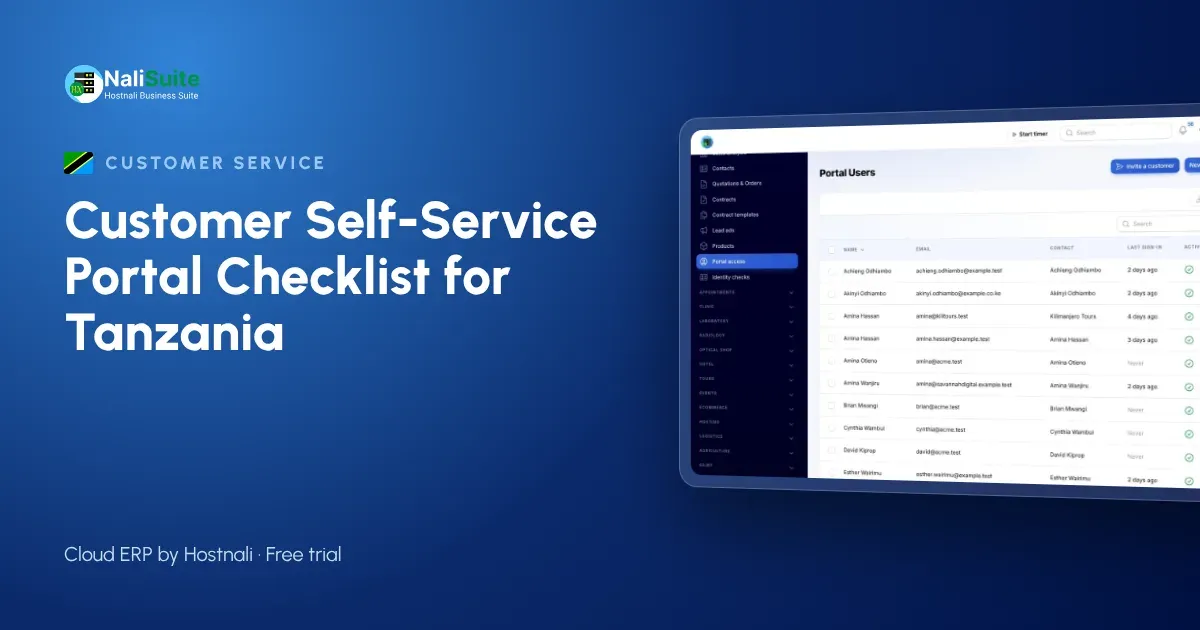
A customer self-service portal lets clients handle those errands themselves. This article is organised as a checklist you can work through before, during and after launch.
Before launch: is the portal worth it for you?
Tick the statements that are true for your business:
- Most revenue comes from customers who buy again and again.
- Some customers pay on account, by invoice, rather than at a counter.
- Staff regularly re-send invoices, receipts or statements.
- Mobile money payments sometimes arrive without a clear reference.
- Quotations take days to be approved.
- Customer complaints arrive by phone, SMS, WhatsApp and email, with no single list.
If you ticked three or more, a portal will probably save you real time.
During setup: the portal checklist
Records
- Every active customer has the right billing contact and email address.
- Company customers have their TIN recorded.
- Duplicate customers are merged, so each customer has one complete history.
- Payments received are recorded and mobile money statements reconciled.
What customers will see
In the NaliSuite customer portal, included in every plan, customers can see invoices and statements, pay, accept quotations, follow orders, open tickets, download documents and manage subscriptions. Decide which of these you will switch on first:
- Invoices, statements and payment (almost always first)
- Quotation acceptance and orders
- Support tickets and knowledge base
- Shared documents and online signatures
- Subscriptions
Payments
- Customers can pay outstanding invoices by M-Pesa, Airtel Money or card. See mobile money payments.
- Your payment provider account is connected and tested with a small real invoice.
Help content
- Short articles explain how to sign in, pay an invoice, download a statement and accept a quotation, published in the helpdesk knowledge base.
At launch: inviting customers
- A pilot group of five to ten regular customers has been invited and has tried it.
- Their questions are answered in the help articles.
- The invitation email explains the benefit in a sentence, in English or Swahili as your customers prefer.
- The invitation comes from your business email address. (Hostnali’s email hosting gives you one on your domain.)
- The portal link is on every invoice, statement and email signature.
After launch: keeping it useful
- Staff answer copy requests with the portal link, not a new PDF.
- New customers are invited when their first invoice is issued.
- Contacts who leave a customer’s company are removed.
- Every month someone checks which large customers have not logged in, and calls them.
- Popular ticket questions become new knowledge base articles.
Questions your own team will ask
Staff sometimes worry that a portal will make their jobs harder or replace them. It helps to answer their questions early.
“Will customers stop calling us?” They will call less about paperwork and more about what matters: new orders, urgent deliveries and problems that need a person.
“What if a customer sees a mistake?” That is a good thing. A wrong balance found in the portal is fixed sooner than one found at year-end. Keep records current and mistakes become rare.
“Who looks after the portal?” Nobody full-time. Invitations, documents and help articles take minutes, and tickets arrive in the helpdesk queue the team already works from.
Data protection: the Personal Data Protection Act
Tanzania’s Personal Data Protection Act, 2022 governs the personal data your portal holds, and the Personal Data Protection Commission (PDPC) enforces it. Keep this part of the checklist short and strict:
- Only contacts authorised by the customer have access.
- Each portal user sees only their own organisation’s records (NaliSuite does this by design).
- Documents are shared only with the customer they concern.
- You have checked the PDPC’s current requirements, including registration, for your business.
Example: a safari outfitter’s trade clients
A camping equipment and vehicle hire company near Arusha supplies tour operators. Each operator books equipment for several safaris a month, pays on account and often needs copies of invoices for its own clients’ files.
Using the portal, each operator’s office sees all its bookings and invoices, settles them by M-Pesa or card from the invoice, and accepts quotations for the high season online. Damage reports and missing-item questions arrive as tickets with photos. The outfitter’s office, which used to spend its mornings on paperwork, now spends them preparing vehicles.
Frequently asked questions
Does the portal cost extra?
No. It is one of the built-in apps on every NaliSuite plan, starting at TZS 5,500 a month.
Can customers pay by M-Pesa from the portal?
Yes. They can pay outstanding invoices with M-Pesa, Airtel Money or a card.
Can I invite more than one person per customer?
Yes. Each contact gets their own login and sees that customer’s records only.
Can the portal use our own domain?
Yes, on plans that include a custom domain or with the custom domain add-on.
Try NaliSuite
Work through the checklist with your own data. See the NaliSuite plans and start a free trial to give your Tanzanian customers their own portal.