 TZS
 KES - Kenya
 UGX - Uganda
 RWF - Rwanda
 NGN - Nigeria
 ZAR - South Africa
 USD - Zimbabwe
 GHS - Ghana
 ETB - Ethiopia
 ZMW - Zambia
 USD - International

A small internet provider in Mwanza, an apartment owner in Arusha, a pre-school in Dodoma and a waste collection service in Dar es Salaam all have customers who pay every month or term. For each of them, a late or forgotten invoice is a gap in cash flow that someone has to fill.
This guide goes through the problems that come with billing repeat customers by hand, and the fix for each.
“I forgot to send the invoices”
The owner is busy, the bookkeeper is on leave, the power is off. Whatever the reason, invoices meant for the 1st go out in the second week, and payments follow later still.
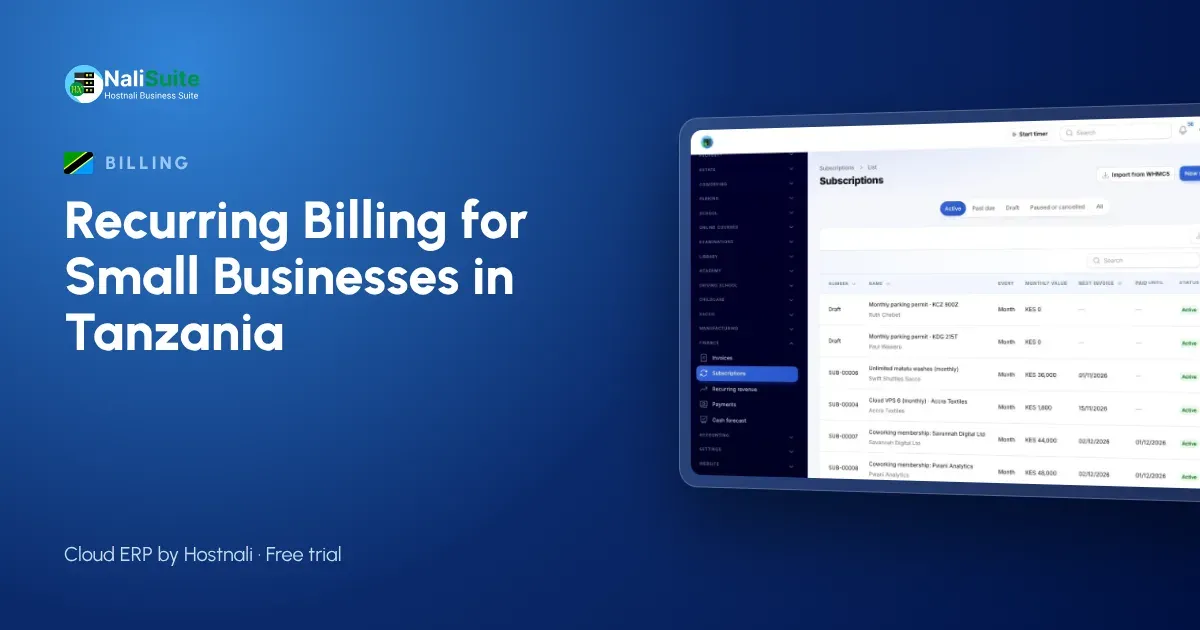
What fixes it: automatic invoices. In NaliSuite Subscriptions, you set up each customer’s subscription once, with the amount, period and start date. Invoices are then created and sent on schedule by email or WhatsApp, whether or not anyone remembers.
“I can’t tell who this M-Pesa payment is from”
A payment arrives with a name that does not match any customer, or with the wrong reference. The person who knows is not in the office.
What fixes it: a pay link on every invoice. When customers pay through the link, by M-Pesa, Airtel Money or card, the payment is tied to that invoice and recorded automatically. The mobile money payments page explains how. Payments that still arrive another way can be matched from the statement in NaliSuite Accounting.
“Some customers are still on the old price”
When each invoice is typed separately, a price change depends on someone editing every customer.
What fixes it: plans. Put customers who pay for the same thing on one plan, such as “Home internet 10 Mbps” or “Pre-school full day”. Change the plan’s price, and every customer on it is billed the new amount from the next period.
“The customer upgraded halfway through the month”
An internet customer moves to a faster package on the 18th. What should the next invoice say?
What fixes it: automatic proration. NaliSuite works out the difference for the remaining days and adds it to the next invoice, so you do not have to calculate it.
“I spend days chasing payments”
What fixes it: scheduled reminders. NaliSuite Invoicing sends reminders before and after the due date, with the pay link each time. Your staff only phone the customers who still have not paid.
“Customers keep calling to ask what they owe”
What fixes it: a customer portal where customers see every invoice and payment and pay what is due. If you allow it, they can also pause, upgrade or cancel themselves, which is useful for internet packages and memberships.
“I don’t know if we are growing”
New customers join, older ones leave quietly. Without a clear view, a recurring business can shrink while looking busy.
What fixes it: watching recurring revenue and churn. NaliSuite’s dashboard shows monthly recurring revenue, new and lost subscribers and churn over time. A sudden rise in cancellations is worth a phone call to find out why.
“Tax has to be right on every invoice”
If your business is VAT-registered, each recurring invoice must show VAT at 18%. Every invoice must also meet TRA’s receipting requirements.
What fixes it: setting VAT on the plan, so it is applied consistently every period, and checking TRA’s current rules for electronic receipts and invoices when you set up your billing.
A simple set-up plan
- List every recurring customer with their amount, period and start date.
- Create plans for each service or package.
- Choose billing dates: the 1st for most, the joining date for memberships.
- Set due dates and a reminder schedule.
- Turn on pay links and the customer portal.
- Review the dashboard once a month.
Example: an internet provider in Mwanza
A small wireless internet provider with around 300 home and office customers collected payments by M-Pesa to a personal number and tracked them in a notebook. Customers paid at different times, and disconnections for non-payment were applied unevenly. After setting up subscriptions with pay links, invoices went out on the 1st and payments were matched automatically. Staff could see who had paid before deciding who to disconnect, and complaints about wrong disconnections stopped.
Moving existing customers across
When you switch from manual billing, start with an accurate list: each customer’s name, phone number, package and the date they last paid. Enter any balance already owed so the first invoice is right. Then send customers a short message explaining that invoices will now arrive automatically with a link to pay, and that the company till or paybill number replaces any personal number they used before. A clean first month builds trust in the new system.
Frequently asked questions
Can I bill termly instead of monthly?
Yes. Subscriptions can be weekly, monthly, quarterly or yearly, or set to match your terms.
What if a customer wants to pause for a month?
Pause the subscription with a restart date. No invoice is created while it is paused.
Can I import customers from WHMCS?
Yes, NaliSuite imports clients and services from WHMCS, which helps hosting and IT providers move without a gap.
Do customers need an app to pay?
No. They open the link on their phone and pay by M-Pesa, Airtel Money or card.
Try NaliSuite
NaliSuite bills your recurring customers on time and collects by M-Pesa, with every payment matched for you. Plans start at TZS 5,500 a month with a free trial; see the plans or find out more about NaliSuite.